Timeline Review
Use this area to quickly scan all media events for a given period. It synchronizes all selected devices with the timeline so you can review their activity at the same time.
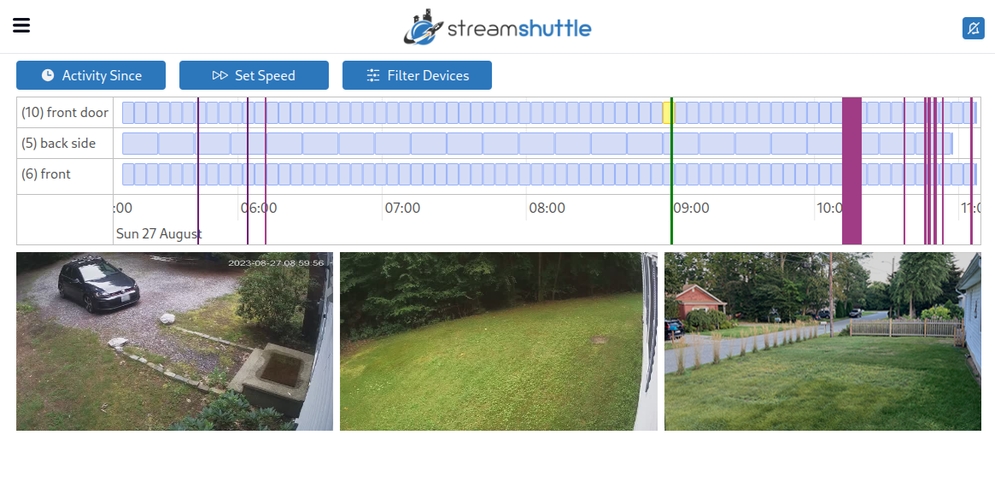
Timeline Review starts in "Preview" mode. This mode shows synchronized preview images for every selected device. If you select exactly one device, "Video" becomes available. Video mode plays that device's full-quality video and keeps playback synchronized with the timeline position.
- Activity events are marked on the timeline. Each device uses a different color.
- Clicking anywhere on the timeline will advance each device block to that time.
- On mobile, use the bottom portion of the timeline, where the timestamps appear, to scroll or zoom.
- Clicking on any of the device blocks will open the video and begin playback at that exact time.
| Option | Description |
|---|---|
| Activity Since | Select how many past hours of activity to review. |
| Set Speed | Set how quickly to advance through the timeline. |
| Filter Devices | Select which hubs and devices to display. |
| Activity Types | Select which activity types to include. - Object: object activity - Motion: motion activity - Audio: audio activity - Triggered: manually triggered activity (clicking the bell) - Alerted: only events that triggered external alerts |
| Preview | Show synchronized preview images for all selected devices. This is the default mode. |
| Video | Play full-quality video synchronized with the timeline. This option is available when exactly one device is selected. |
* If a device block shows "not avail," no event was recorded for that device at the current time. Devices in remote storage areas show "Device X is not local." You can still click them to open the video and begin playback at that time.